User management

Words by
Kaine Shutler
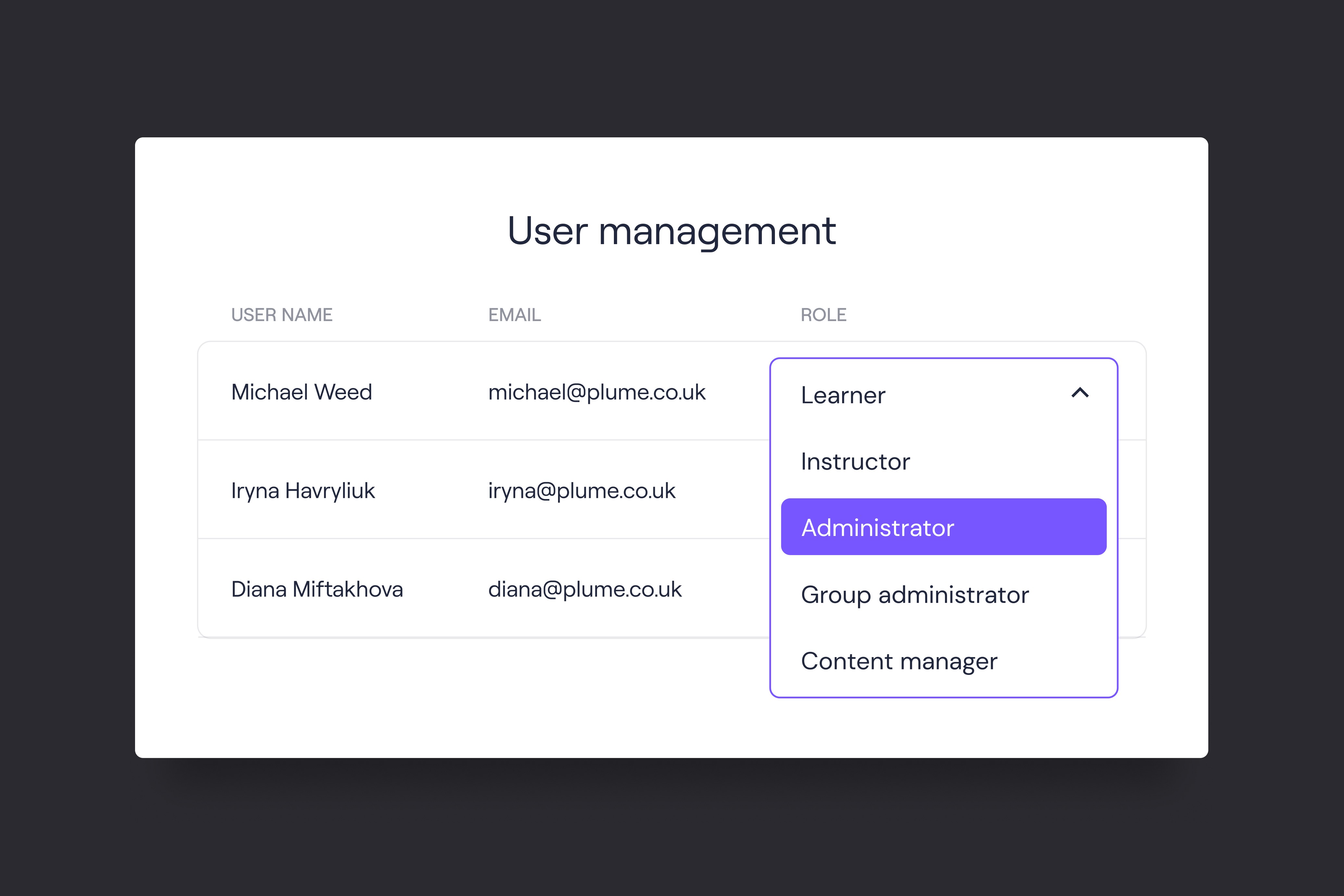
Through user management, every user within the LMS gets assigned to a particular permission-based role, which determines what level of access they’ll have to the system. These permission roles usually include:
Administrator
Group administrator
Content manager
Instructor
Learner
Depending on the permission level, these roles are able to add or remove users, manage the course and group access, manually remove or enrol users in certain groups and courses, add or edit course content, access quizzes and assessment results and finally get access to specific user data.
Effective user management functionality will help you as an LMS owner to ensure the following:
Course data security. Only authorized users with specific permission-based roles can view and edit data within the LMS, which reduces the chances of data leaks.
Your team’s efficiency. Everyone who has access to the LMS performs a particular role, and their interface is simplified to help them work on their individual responsibilities.
User management is one of the most crucial aspects of running a successful learning product. It allows you to better manage data as well as all activities within the platform to ensure the best learning experience for users.
Kaine Shutler is the founder and managing director of Plume, a studio specialising in custom learning technology. With 14 years of experience, Kaine has established expertise in Learning Management Systems, UI/UX design, and scalability, working with clients including Google and training businesses across multiple sectors.



User management
Words by
Kaine Shutler
Through user management, every user within the LMS gets assigned to a particular permission-based role, which determines what level of access they’ll have to the system. These permission roles usually include:
Administrator
Group administrator
Content manager
Instructor
Learner
Depending on the permission level, these roles are able to add or remove users, manage the course and group access, manually remove or enrol users in certain groups and courses, add or edit course content, access quizzes and assessment results and finally get access to specific user data.
Effective user management functionality will help you as an LMS owner to ensure the following:
Course data security. Only authorized users with specific permission-based roles can view and edit data within the LMS, which reduces the chances of data leaks.
Your team’s efficiency. Everyone who has access to the LMS performs a particular role, and their interface is simplified to help them work on their individual responsibilities.
User management is one of the most crucial aspects of running a successful learning product. It allows you to better manage data as well as all activities within the platform to ensure the best learning experience for users.
Kaine Shutler is the founder and managing director of Plume, a UK-based agency specialising in custom learning technology. With 14 years of experience, Kaine has established expertise in Learning Management Systems, UI/UX design, and scalability, working with clients including Google and training businesses across multiple sectors.
User management
Words by
Kaine Shutler
Through user management, every user within the LMS gets assigned to a particular permission-based role, which determines what level of access they’ll have to the system. These permission roles usually include:
Administrator
Group administrator
Content manager
Instructor
Learner
Depending on the permission level, these roles are able to add or remove users, manage the course and group access, manually remove or enrol users in certain groups and courses, add or edit course content, access quizzes and assessment results and finally get access to specific user data.
Effective user management functionality will help you as an LMS owner to ensure the following:
Course data security. Only authorized users with specific permission-based roles can view and edit data within the LMS, which reduces the chances of data leaks.
Your team’s efficiency. Everyone who has access to the LMS performs a particular role, and their interface is simplified to help them work on their individual responsibilities.
User management is one of the most crucial aspects of running a successful learning product. It allows you to better manage data as well as all activities within the platform to ensure the best learning experience for users.
Kaine Shutler is the founder and managing director of Plume, a UK-based agency specialising in custom learning technology. With 14 years of experience, Kaine has established expertise in Learning Management Systems, UI/UX design, and scalability, working with clients including Google and training businesses across multiple sectors.
Plan your next learning platform with our founder
About Plume
As the leading custom learning platform provider serving training businesses in the US, UK and Europe, we help businesses design, build and grow pioneering learning tech that unlocks limitless growth potential.
Plan your next learning platform with our founder
About Plume
As the leading custom learning platform provider serving training businesses in the US, UK and Europe, we help businesses design, build and grow pioneering learning tech that unlocks limitless growth potential.
Plan your next learning platform with our founder
About Plume
As the leading custom learning platform provider serving training businesses in the US, UK and Europe, we help businesses design, build and grow pioneering learning tech that unlocks limitless growth potential.
